# Proxmox-Port
I plan to port Proxmox VE and Proxmox Backup Server to any architecture.
By now, arm64/riscv64/loongarch64 is finished.
## 1. Source
The Proxmox-Port code is located in the following repositories.
- [zfsonlinux](https://github.com/jiangcuo/zfsonlinux)
- [pve-qemu](https://github.com/jiangcuo/pve-qemu)
- [pve-lxc-syscalld](https://github.com/jiangcuo/pve-lxc-syscalld)
- [pve-lxcfs](https://github.com/jiangcuo/pve-lxcfs)
- [pve-installer](https://github.com/jiangcuo/pve-installer)
- [pve-edk2-firmware](https://github.com/jiangcuo/pve-edk2-firmware)
- [proxmox-mini-journalreader](https://github.com/jiangcuo/proxmox-mini-journalreader)
- [proxmox-backup](https://github.com/jiangcuo/proxmox-backup)
- [proxmox-backup-restore-image](https://github.com/jiangcuo/proxmox-backup-restore-image)
- [proxmox-backup-qemu](https://github.com/jiangcuo/proxmox-backup-qemu)
- [pve-manager](https://github.com/jiangcuo/pve-manager)
- [qemu-server](https://github.com/jiangcuo/qemu-server)
- [pve-port-kernel](https://github.com/jiangcuo/pve-port-kernel)
- [pve-common](https://github.com/jiangcuo/pve-common)
- [pve-qemu](https://github.com/jiangcuo/pve-qemu)
- [pve-container](https://github.com/jiangcuo/pve-container)
- [lxcfs](https://github.com/jiangcuo/lxcfs.git)
- more...
Master branch is mirror, checkout branch to arm64 / riscv64 / loongarch64 .You can view and build package.
## 2. Progress
* pve8 base on debian sid(loongarch64/riscv64) -> done
* pve8 base on debian12(arm64) -> done
## 3. Support
Mail: jiangcuo@bingsin.com
Issue: https://github.com/jiangcuo/Proxmox-Port/issues
Discord: https://discord.gg/ZdbD2gDcnP
Wiki: https://github.com/jiangcuo/Proxmox-Port/wiki
## 4. Tested platform:
- Rockpi (arm64)
- Raspberry Pi (arm64)
- Amlogic TV box (arm64)
- Kunpeng (arm64)
- FT (arm64)
- Ampere (arm64)
- Apple (arm64,vm only,no kvm support)
- 3A5000/3A6000/3C5000 (loongarch64)
- VisionFive2 (riscv64)
## 5. Features
- ramfb support.
- add more pice on vm,so we can hotplug and use more nets disks.(not perfect)
- set gic-version=host.
- tpm
## 6. Version
### pve
- 8.1.3 (arm64)
- 8.1.3 (loongarch64)
- 8.1.3 (riscv64)
### pbs
- 3.1.2 (arm64)
- 3.1.2 (loongarch64 with 4k kernel)
### screen shot
arm64
 riscv64
 loongarch64
 ## 7. Changelog
[Changelog](changlog.md)
## 8. Installation
If you are using arm64 server that supports EFI,you can install proxmox-ve with iso.
https://mirrors.apqa.cn/proxmox/isos/
If you are using u-boot device or failed with iso, you can install proxmox-ve from repo.
Head to the wiki page to learn more.
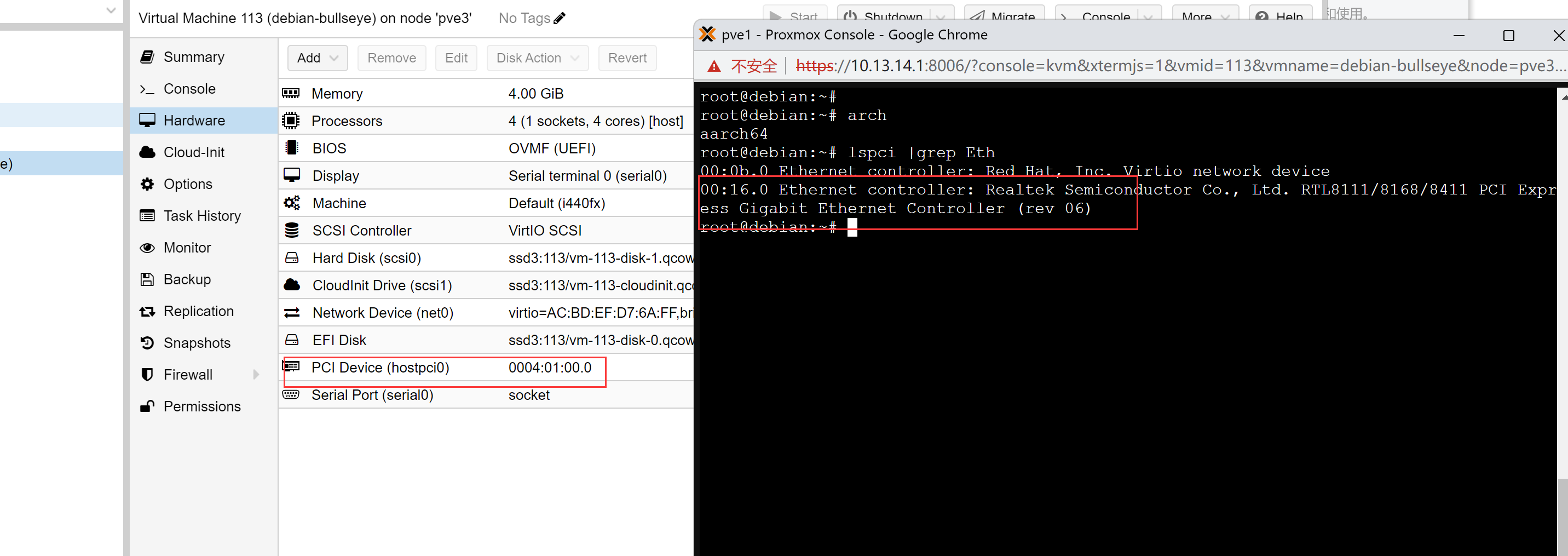
## 9. Passthrough
Hardware passthrough looks good
## 10. More ?
https://github.com/jiangcuo/Proxmox-Port/wiki
## 11. Next
1. Bring together the code for Arm64 Loongarch64 Riscv64 so that it can be built at the same time
2. Optimize the code on Port-WebUI to be compatible with x86.This allows for compatibility with multiple architectures on the same set of APIs
# Interesting thing
Proxmox VE is really awesome!
Thanks to Proxmox adding support for Arm, now I just need to change code
```patch
- $arch eq 'aarch64'
+ $arch ne 'x86_64'
```
and easy support other architectures.
I sincerely hope that Proxmox can make their products support any platform which has kvm supported !
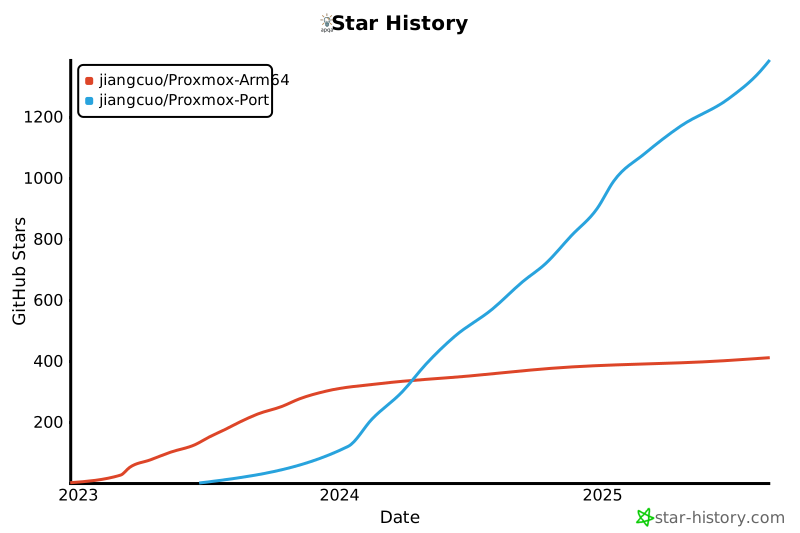
## Star History
[](https://star-history.com/#jiangcuo/Proxmox-Arm64&jiangcuo/Proxmox-Port&Date)
## 7. Changelog
[Changelog](changlog.md)
## 8. Installation
If you are using arm64 server that supports EFI,you can install proxmox-ve with iso.
https://mirrors.apqa.cn/proxmox/isos/
If you are using u-boot device or failed with iso, you can install proxmox-ve from repo.
Head to the wiki page to learn more.
## 9. Passthrough
Hardware passthrough looks good

## 10. More ?
https://github.com/jiangcuo/Proxmox-Port/wiki
## 11. Next
1. Bring together the code for Arm64 Loongarch64 Riscv64 so that it can be built at the same time
2. Optimize the code on Port-WebUI to be compatible with x86.This allows for compatibility with multiple architectures on the same set of APIs
# Interesting thing
Proxmox VE is really awesome!
Thanks to Proxmox adding support for Arm, now I just need to change code
```patch
- $arch eq 'aarch64'
+ $arch ne 'x86_64'
```
and easy support other architectures.
I sincerely hope that Proxmox can make their products support any platform which has kvm supported !
## Star History
[](https://star-history.com/#jiangcuo/Proxmox-Arm64&jiangcuo/Proxmox-Port&Date)